WPA3, OWE and WPA Enterprise wireless security
Netcraze routers support the WPA3-PSK, OWE and WPA2/WPA3-Enterprise security algorithms for Wi-Fi networks.
WPA3-PSK (Wi-Fi Protected Access, developed by the Wi-Fi Alliance and announced in 2018) is a security algorithm that provides data protection in Wi-Fi networks. It pertains to the WPA3-Personal mode, included in the third version of the WPA3 protocol set. The new protocol replaces WPA2, introduced in 2004. The main idea of implementing the new WPA3 protocol is to eliminate conceptual flaws in the WPA2 protocol, particularly to protect against certain types of attack (Key Reinstallation Attacks, KRACK). The WPA3 protocol offers higher level of security than WPA2.
WPA3 supports two modes of operation: WPA3-Personal and WPA3-Enterprise.
WPA3-Personal (WPA3-PSK) provides 128-bit data encryption.
OWE (Opportunistic Wireless Encryption) is an encryption method to enhance the security and privacy of users connecting to open (public) Wi-Fi networks.
Please see the following links for more information on WPA3 and OWE security mechanisms: WPA3, SAE, OWE.
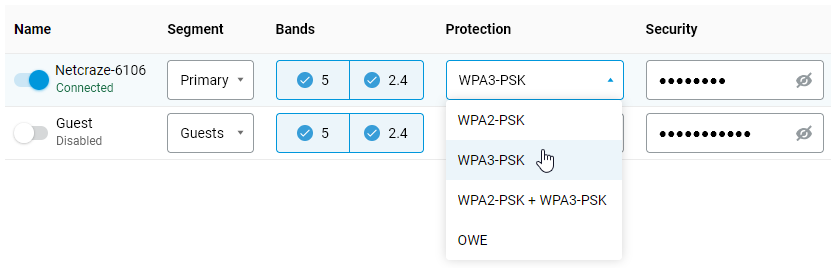
WPA3-PSK and OWE settings can be configured in the web interface under the Local Network menu section on the Wi-Fi page, in the Protection field. For example:
Important
To use the WPA3-PSK and OWE network protection mechanisms, the connected device must support these algorithms in the driver of its radio module.
When using the mixed encryption type WPA2+WPA3, you may experience speed degradation on some mobile devices. For more information, please refer to the article What can cause speed degradation in mixed mode 'WPA2 + WPA3'?
You should only enable WPA2+WPA3 Mixed Mode if you are sure that all your home network devices will operate correctly in this mode.
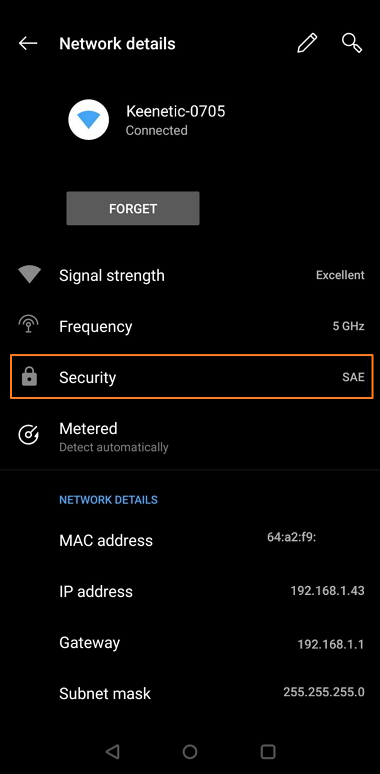
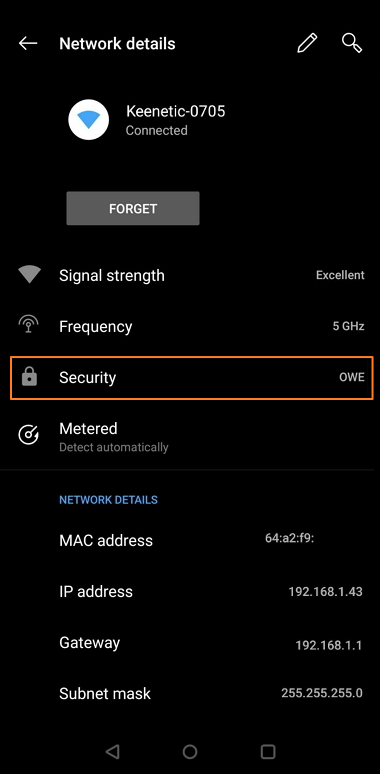
Below are examples of connections using the WPA3 and OWE.
WPA3-PSK network protection (SAE):
OWE open network protection:
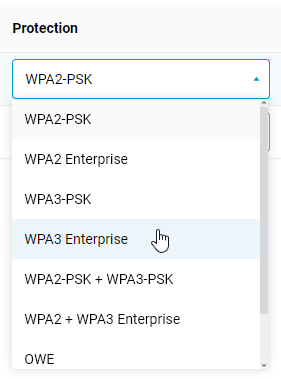
To use the WPA2/WPA3 Enterprise protocols, you need to install the WPA Enterprise system component. You can do this on the System Settings page, under the NDMS & Updates tab, by clicking Component options.

After that, you will be able to configure the WPA Enterprise protocols in the Wi-Fi settings on the Wi-Fi page.
Note
WPA3 provides two modes of operation: WPA3-Personal and WPA3-Enterprise.
WPA3-Personal. The most important change in the WPA3 protocol is the use of a new Simultaneous Authentication of Equals (SAE) method, which provides extra protection against brute-force attacks. SAE is intended to replace the simple PSK (Pre-Shared Key) exchange method used in WPA2. The goal of SAE is to protect the connection establishment process as much as possible from hacker attacks. SAE works under the assumption of device equality. Either side can send a connection request. Then, they start sending their authentication information independently, instead of just exchanging messages one at a time, as with the PSK key exchange method. SAE uses a special variant of establishing the connection (dragonfly handshake), which uses cryptography to prevent an attacker from guessing the password.
In addition to the above, SAE uses perfect forward secrecy (PFS) for an additional security enhancement that the PSK did not have. Let's say an attacker gets access to encrypted data that a router sends and receives from the Internet. Previously, an attacker could save this data and then, if the password was successfully picked, decrypt it. With SAE, a new encryption password is set with each new connection, and if a hacker penetrates the network at some point, he can only steal the password from the data sent after that point.
The SAE authentication method is described in detail in the IEEE 802.11-2016 standard.
WPA3-Enterprise. This operating mode is intended for use in institutions with the highest demands on information security and confidentiality.
OWE (Opportunistic Wireless Encryption) is an extension of the IEEE 802.11 standard, similar to SAE. OWE secures data transmitted over an unsecured network by encrypting it. Users are not required to take any extra steps or enter passwords to connect to the network.
Many attacks that occur on an open network are classified as passive. When many clients connect to a network, an attacker can collect a great deal of data simply by filtering the information that passes by.
OWE uses opportunistic encryption, defined in RFC 8110, to protect against passive eavesdropping. It also prevents packet injection attacks, where an attacker tries to disrupt the network by creating and transmitting special data packets that look like part of regular network operation.
Notice
This article explains how to configure OS versions 5.1 and above. Instructions for earlier OS versions can be found in the article WPA3, OWE and WPA Enterprise wireless security (for OS 5.0 and earlier).