Which Netcraze model do I need?
Netcraze routers are designed to connect your house or flat to the Internet. They integrate your household electronics and gadgets into a network and allow you to access the Internet simultaneously from multiple devices — tablets, smartphones, laptops, and computers. With a router, you can connect Smart TVs to the Internet and arrange access to IPTV, digital telephony, and other value-added services.
Besides that, any Netcraze router can be used as an extender to expand the wireless network’s coverage area.
A Netcraze router can be connected to your ISP (and connects your house or flat to the Internet):
via a dedicated Ethernet line,
via a mobile broadband network and a 5G/4G/LTE USB modem,
via a telephone or ADSL/VDSL leased line,
via a PON terminal or modem with an Ethernet port provided by your ISP,
via a fibre optic cable using an SFP Gigabit Ethernet module,
as well as via an operator's or private Wi-Fi hotspot.
There are many models in the Netcraze router line, each with distinctive features.
To answer the question of which model you need,
Decide what tasks the router will perform
Answer the following questions for yourself:
How many clients in your home network will be connected to the router? Which ones will be connected by cable, and which ones by Wi-Fi?
Mobile home network devices are usually connected via Wi-Fi. At the same time, a cable is recommended to connect a desktop computer, smart TV, NAS, or set-top box to receive IPTV.
How heavily will the router be used? Is it for simple web browsing, searching for information and communication, or for transferring large files, watching high-definition video online, heavy P2P downloading and running a VPN server?
If the router's load is heavy, we recommend choosing a high-performance model. For example, our flagship multi-gigabit models, the Titan SE and Titan, will meet the needs of even the most demanding users. They are equipped with a 3-core 1.8 GHz processor, 1 GB of DDR4 RAM and an 8-stream dual-band radio module with a BE7200 speed rating. The Titan SE (KN-4210) features a slot for an M.2 NVMe solid-state drive (SSD) in the most popular 2280 form factor, whilst the Titan (KN-1812) model has a 10-gigabit Ethernet port, enabling Internet connections of even exceeding
5 Gbps.
Which rooms will you need Wi-Fi Internet access in?
Usually, a single Wi-Fi router is enough to organize a wireless network within a two-room flat to get a good signal in all the rooms.
Remember, the farther away from the access point, the weaker the Wi-Fi signal. The signal level drops significantly when the signal passes through walls. For a good signal, it is desirable to have no more than one concrete wall between the access point and the client device.
Important: Do not try to cover a multi-room or multi-level space with a single router. When you need more coverage, add one or more of our devices as Wi-Fi Extenders where required. This is the easiest and most effective way to expand your wireless network. When combined into a Mesh Wi-Fi System, they form a seamless network throughout your home or office.
Are you planning to use the 5 GHz band for wireless networking?
If you have modern gadgets and devices that can work on a
5 GHzwireless network, we recommend using this frequency band, as it has a freer radio spectrum (due to less use of5 GHzdevices) and more channels, which lead to increased stability and connection speed. You can find the details in the article ???.
Do you have wireless devices that support the latest Wi-Fi 6/7 standard and want to use them on your network?
Use Wi-Fi AX3000 class models to organize a Wi-Fi System with the support of Wi-Fi 6 (802.11ax). For example, Titan SE, Titan, Hero or Hopper are suitable as the
Main Router, while the Sprinter or Racer models are great asExtenders.To set up a Wi-Fi System that supports the Wi-Fi 7 (802.11be) standard, use the flagship Titan SE (KN-4210) or Titan (KN-1812) BE7200 class models.
Are you planning to use Internet access via a connection to a mobile broadband operator?
Any Netcraze router with a USB port allows you to connect 5G/4G and CDMA modems (from our list of supported) for mobile Internet access. External USB modems must be purchased separately.
Our range of models includes Hero 5G, Hopper 4G, Speedster 4G, Explorer 4G and Runner 4G, which have an integrated modem to connect to your mobile Internet. Using these models, you do not need to buy an additional USB modem; it is enough to insert a SIM card of any operator into a special slot on the router.
Do you need a USB port in the router? Do you plan to connect an external drive, flash drive, or printer via a USB interface to share access to your home network?
A USB port on your router and support for USB storage devices allow you to set up a file server with WebDAV or FTP access from the Internet, a standalone integrated torrent client that works independently of your computer, or a DLNA server for accessing your home media library from devices that support this technology (such as Smart TVs, tablets, or smartphones).
Important: Not all models with a USB port support USB drives. Some models are equipped with a USB port designed exclusively for use with compatible 5G/4G USB modems. These models do not support connecting USB storage devices or printers. Please check the technical specifications to ensure the device has a full-function USB port that supports USB storage devices and printers.
Are you planning to connect a network-attached storage (NAS) device to your router? And do you need to ensure high data transfer speeds between the NAS and the local network?
Modern network-attached storage devices are now increasingly equipped with a
2.5 Gbpsnetwork interface for connecting to the local network, which increases data transfer speeds by almost 2.5 times compared to standard Gigabit. Our Titan SE, Titan (KN-1812), Hero 5G, Giga (KN-1012) and Challenger (SE) models feature a2.5 Gigabit EthernetLAN port, to which you can connect the network-attached storage directly whilst maintaining high data transfer speeds.In addition, the Titan SE (KN-4210) model features a slot for connecting an M.2 NVMe solid-state drive (SSD) in the most popular 2280 form factor. The throughput of such a drive in the NDMS operating system, according to synthetic benchmarks, exceeds
800 MB/s(PCI-E 1x), whilst the actual throughput, for example, via two 2.5 Gigabit ports, reaches500 MB/s.
Are you planning to add additional PoE-powered access points to expand your wireless network?
The Orbiter 6, Voyager Pro, Orbiter Pro and Stellar 6 access points can be used for PoE connections. The Orbiter 6, Voyager Pro and Orbiter Pro are indoor access points featuring a discreet design, suitable for installation on a desk, wall or even the ceiling. The Stellar 6 model, meanwhile, is an all-weather outdoor access point that can be easily mounted on a wall or mast both indoors and outdoors. The Stellar 6's housing, with an IP65 rating for protection against moisture and dust and a built-in heater, allows the device to operate at temperatures as low as −40 °C in all weather conditions, whilst protection against surge voltages and electrostatic discharges ensures stable operation of the electronic components.
To connect and power Wi-Fi access points, IP cameras and telephones via an Ethernet cable, you can use the Netcraze PoE+ Adapter, a 30 W Gigabit power adapter.
Choose a Netcraze router from the catalogue
The catalogue on the Netcraze website provides a complete list of current models from which you can select according to parameters. You can also compare models, find the main features and see technical specifications. You can also select models that meet your requirements on the official Netcraze online shop website.
Note
— Some models are equipped with a USB port designed exclusively for use with compatible 5G/4G USB modems. These models do not support connecting USB storage devices or printers.
— You can connect a printer with a USB interface to the USB port of a router that supports printers (except for GDI and CAPT printers). Here is the list of compatible printers.
— Most routers support dual-band Wi-Fi — operating the access point on two frequency bands, 2.4 GHz and 5 GHz.
The more devices work on the same frequency, the more they interfere with each other, severely compromising connection quality. This is especially true in blocks of flats, where there are Wi-Fi clients in almost every flat. The advantage of the 5 GHz frequency is the free radio spectrum, as this frequency is used less, and, as a result, there is minimal interference and maximum connection quality. To use the 5 GHz network, your smartphone, tablet, laptop, or USB adapter must support this frequency.
— Models featuring a hardware mode switch on the casing are convenient for extending the coverage area of an existing Wi-Fi network without the need to lay additional cables. The additional Extender Mode is available for this purpose.
— To extend the coverage of a Wi-Fi System, you can easily use compact Buddy Wi-Fi Range Extenders that plug directly into an electrical socket. The Buddy series models act only as extenders, not as routers.
Suppose you choose a high-performance router to connect to the Internet on a data plan with over 100 Mbps. You plan to connect a printer to the router for network printing, an external hard drive to use as a file server, and mobile devices via Wi-Fi on the 5 GHz band with Wi-Fi 6 support.
Select a router model according to the required parameters. Based on these parameters, the following models have been selected:
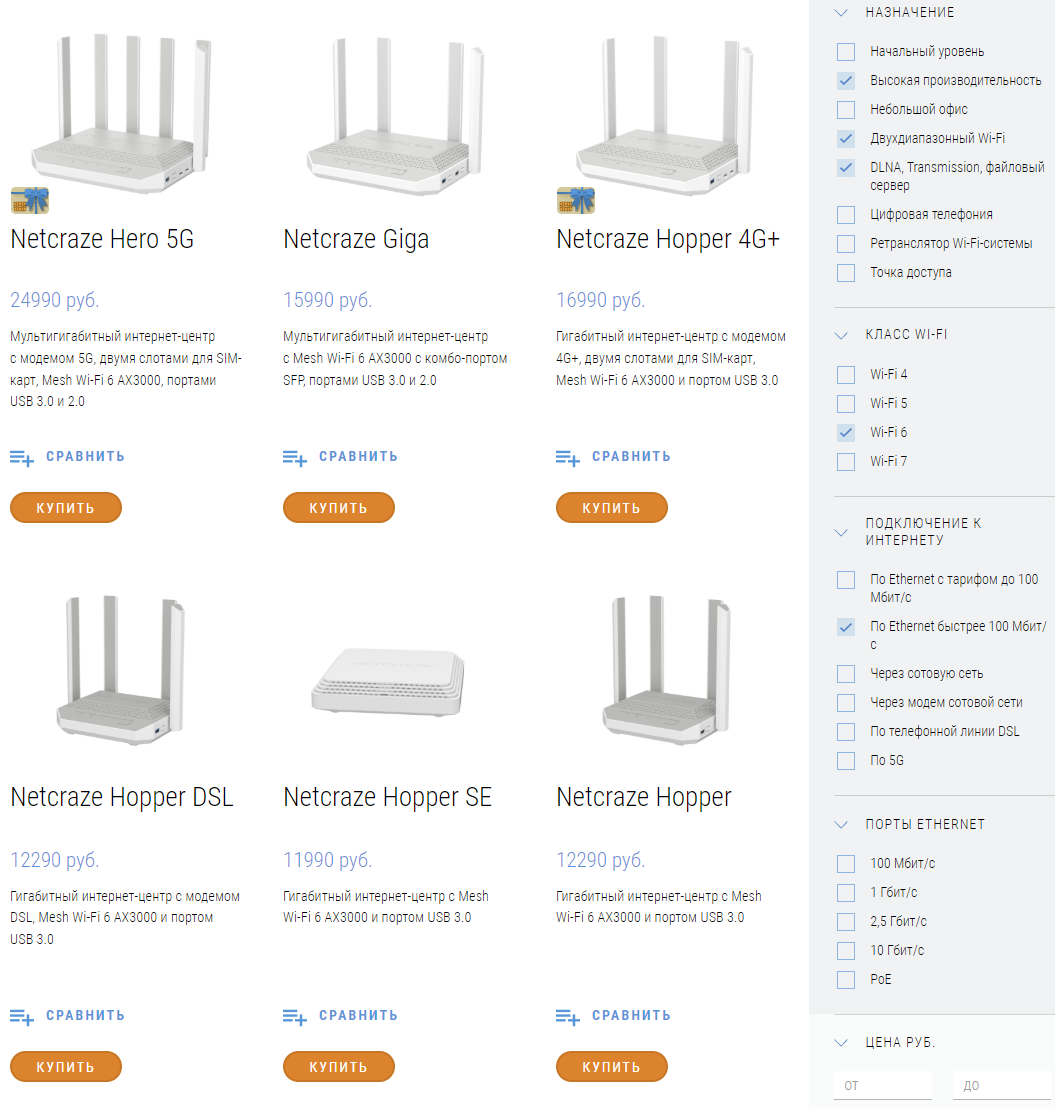
To compare the specifications of the selected models, click on Compare. In the model comparison window that appears, you can select the parameters for your convenience: Key, Differentiating and all parameters.
Read the complete list of specifications and features for your chosen model
Did you miss anything? The list of technical specifications is available on the router’s page in the catalogue on the website Netcraze or on the official online shop’s website.
Please consult our support team if you still have questions about the models.